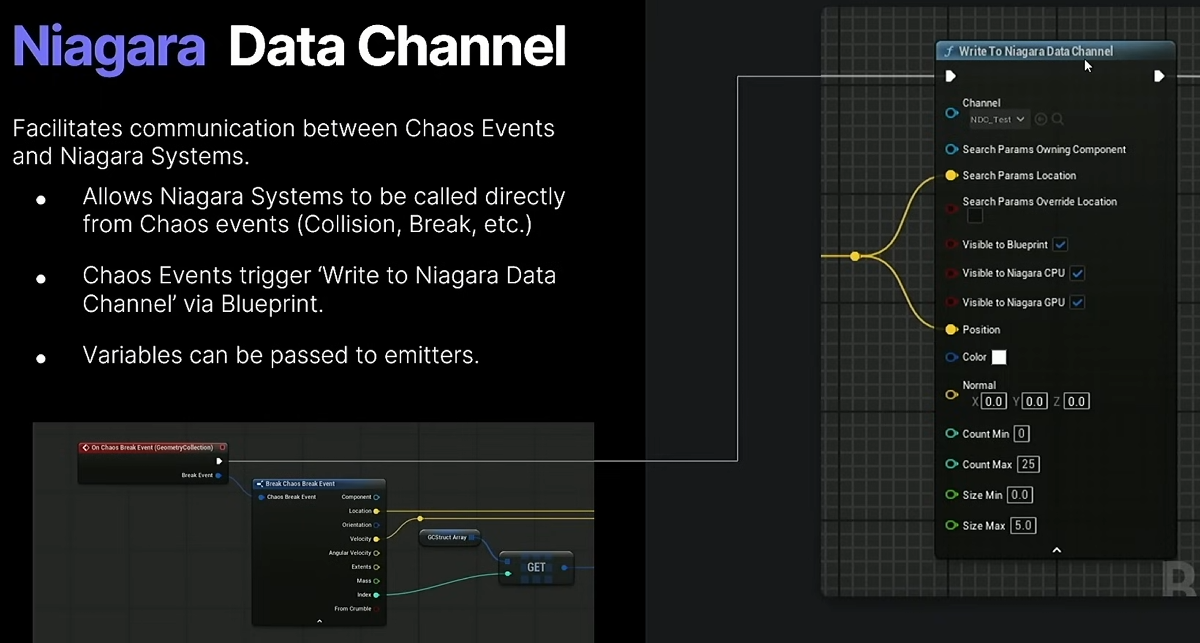
For dataflow see Dataflow Graph.
Dump of Geometry Collection internal types
FGeometryCollectionPhysicsProxy
Class to manage sharing data between the game thread and the simulation thread.
FGeometryCollection
Derived from FTransformCollection, derived from FManagedArrayCollection.
Hold in a UGeometryCollection which is the Rest Collection in the GCC.
FGeometryDynamicCollection
Managed arrays for simulation data used by the GeometryCollectionProxy
Stores per instance data for simulation level information.
Derived from FTransformDynamicCollection, derived from FManagedArrayCollection.
The proxy generates it in FGeometryCollectionPhysicsProxy::InitializeDynamicCollection.
The GCC holds the passed FGeometryDynamicCollection.
FGeometryCollectionEmbeddedExemplar
Hard to understand what exactly this is, used to build embedded ISMs in UGeometryCollectionComponent::InitializeEmbeddedGeometry.
UGeometryCollection
UObject wrapper for the FGeometryCollection.
Geometry Collection Component
About the physics
Also check above category.
All particles (also called physic objects) exists once the physic state is created.
The proxy type is FGeometryCollectionPhysicsProxy.
The event dispatcher is UChaosGameplayEventDispatcher.
The GCC inherits IChaosNotifyHandlerInterface.
FGeometryCollectionItemIndex is used to get the index of the hit proxy body from a hit (See SetHitResultFromShapeAndFaceIndex).
Access to physics
- Get
FGeometryCollectionPhysicsProxywithGeometryCollectionComponent->GetPhysicsProxy() - Get Read/Write physics interface
Chaos::FReadPhysicsObjectInterface_Internal PhysicsObjectInterface = Chaos::FPhysicsObjectInternalInterface::GetRead();(watch out there is a internal and external version, use internal if you are on the physic thread) - Get
Chaos::FPhysicsObjectHandleof a particle withGCC->GetAllPhysicsObjects()
COPY_ON_WRITE_ATTRIBUTE
Some autocompleted functions on UGeometryCollectionComponent will point to the COPY_ON_WRITE_ATTRIBUTES macro which is a list of COPY_ON_WRITE_ATTRIBUTE macro declarations.
Those are deprecated for GCC since 5.4 and therefore cannot be used.
If you want to access those attributes, you need to use the “Attribute” methods on FManagedArrayCollection (for engine usage examples, go to the list of static FName declared in FGeometryCollection, for example FGeometryCollection::VerticesGroup).
FGeometryDynamicCollection also has its own declared static attributes name.
Collision
See CollisionProfilePerParticle and CollisionProfilePerLevel.
See UGeometryCollectionComponent::LoadCollisionProfiles.
Events
GCC events such as breaks and other collision events are handled by the EventDispatcher (UChaosGameplayEventDispatcher).
It is created in the GCC constructor so there is 1 event dispatcher actor instance per GCC.
More info at [[Physics types#uchaosgameplayeventdispatcher|UChaosGameplayEventDispatcher]]
Field Commands
For fields see Chaos Fields
Commands sent to UGeometryCollectionComponent::DispatchFieldCommand will end up in FGeometryCollectionPhysicsProxy::BufferFieldCommand_Internal inside a FFieldData.
Which is iterated inside FGeometryCollectionPhysicsProxy::FieldParameterUpdateCallback.
For example calling AddImpulse will result in FieldVectorParameterUpdate being eventually called.
Anchor
See SetAnchoredXXXX functions.
Change collision profile on broken parts/per particle
Use SetPerParticleCollisionProfileName. This will update CollisionProfilePerParticle which is read in UGeometryCollectionComponent::LoadCollisionProfiles.
Basic setup
void ABPGDestructibleBase::OnChaosBreakEvent(const FChaosBreakEvent& BreakEvent)
{
    if (UGeometryCollectionComponent* GCC = Cast<UGeometryCollectionComponent>(BreakEvent.Component))
{
	    const int32 ParticleIndex = BreakEvent.Index;

	    // A member var of type TArray<int32> to store all broken parts over time
	    // SmallBrokenPartsCollisionProfile is of type FCollisionProfileName
	    SmallBrokenPartsBoneIds.Add(ParticleIndex);
	    GCC->SetPerParticleCollisionProfileName(SmallBrokenPartsBoneIds, SmallBrokenPartsCollisionProfile.Name);
	}
}
Get particle bounds
Do const FBox Box = PhysicsObjectInterface.GetBounds({PhysicsObject}); (there is also a GetWorldBounds version)
Example of code to run on tick to draw particle bounds with their volume
UGeometryCollectionComponent* GCC = Data.Key.Get();
TArray<Chaos::FPhysicsObject*> PhysicsObjects = GCC->GetAllPhysicsObjects();
for (auto& PhysicsObject : PhysicsObjects)
{
    const FBox Box = PhysicsObjectInterface.GetWorldBounds({PhysicsObject});

    const Chaos::FReal Volume = Box.GetVolume();
    const bool bIsSmall = Volume <= 50000;

    const FColor Color = bIsSmall ? FColor::Green : FColor::Red;

    FU_Draw::DrawDebugBoxFrame(GetWorld(),
       Box.GetCenter(), Box.GetExtent(), FRotator::ZeroRotator,
       Color, 1, 1
    );

    FU_Draw::DrawDebugStringFrame(GetWorld(),
       Box.GetCenter(), FU_Utilities::PrintCompactFloat(Volume), Color, 1
   );
}
From hit get particle
// not fully tested, WIP code

auto* Proxy = HitGCC->GetPhysicsProxy();
auto Item = VelocityHitResult.Item;

auto* ParticleAtIndex = Proxy->GetPhysicsObjectByIndex(Item);
auto* RealPart = ParticleAtIndex->GetParticle<Chaos::EThreadContext::External();
auto Loc = RealPart->GetX();
auto Rot = RealPart->GetR();

auto* RigidParticle = RealPart->CastToRigidParticle();
auto LinearVel = RigidParticle->GetV();
auto AngularVel = RigidParticle->GetW();
Cache
See ACacheManager and AChaosCachePlayer.
Playback is done with a FComponentCacheAdapter, see derived class such as FGeometryCollectionCacheAdapter.
Optimizing
Nanite
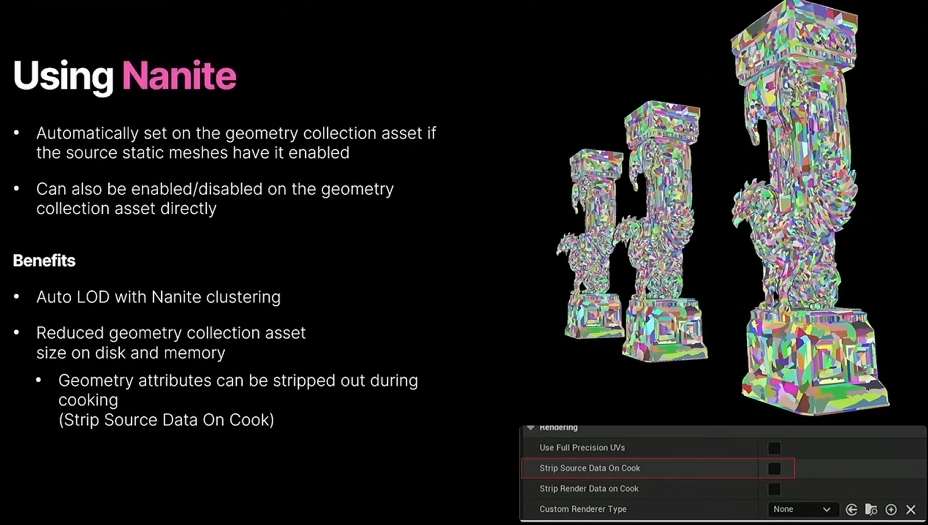
If your mesh has a lot of polygons try to enable Nanite.
Root Mesh Proxies
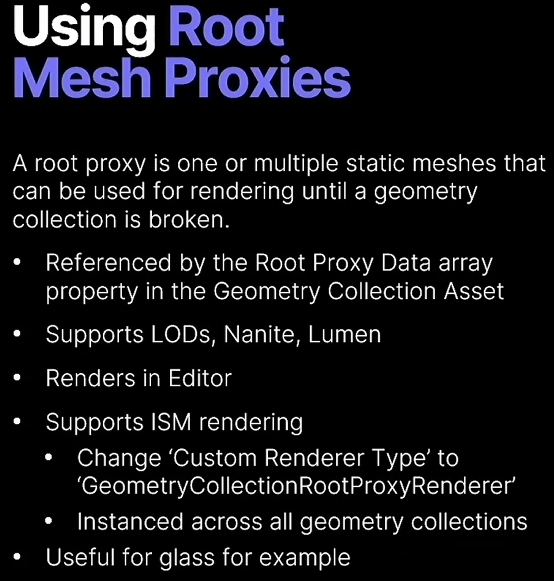
You can replace your GC with one or multiple static meshes until the GCC breaks.
Remove On Break
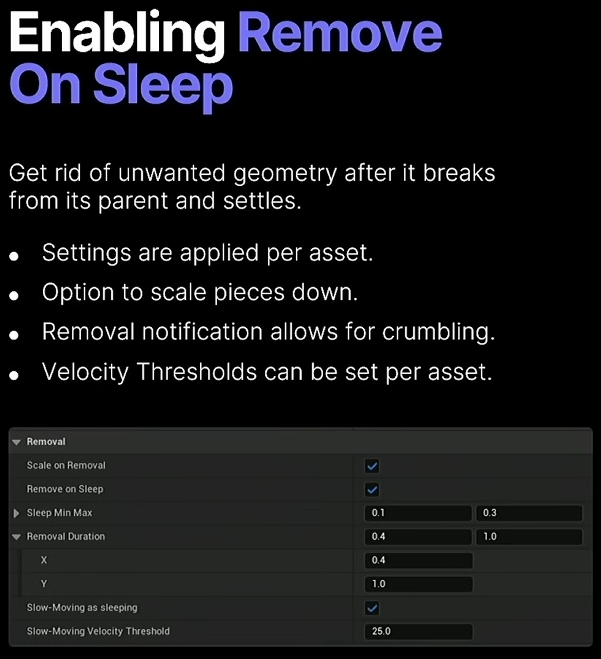
Remove On sleep
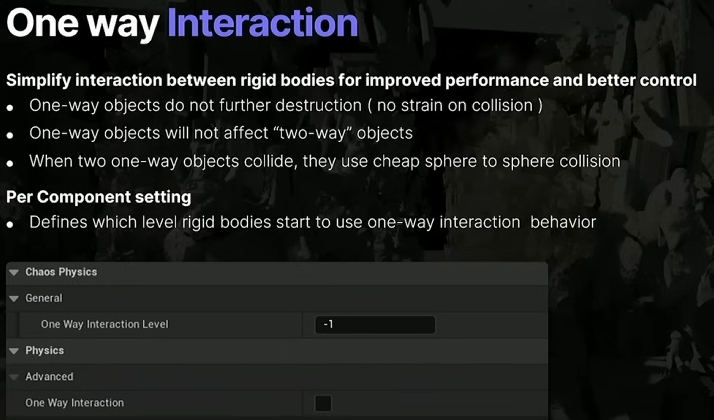
One way Interaction
Throttling Mechanisms
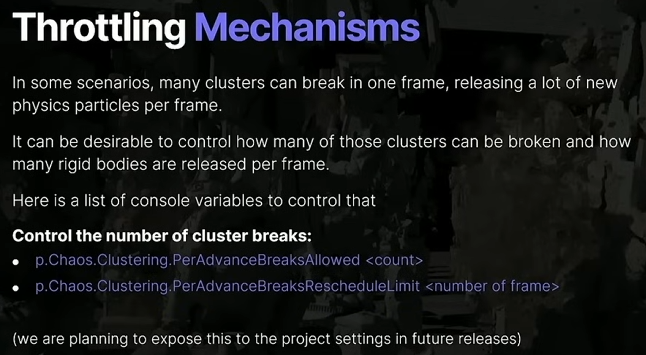
p.Chaos.Clustering.PerAdvanceBreaksAllowed <count>p.Chaos.Clustering.PerAdvanceBreaksRescheduleLimit <nb of frame>
Not using fields
Fields gives you a lot of control but has some overhead that can’t be ignored in some cases.
You can use instead Apply External Strain and Apply Breaking Linear Velocity/Apply Breaking Angular Velocity.
You can also use internal strain if you want to apply damage over time.
Miscs
Make it feel heavier
See this section of GDC 2025.
Cause destruction from collision
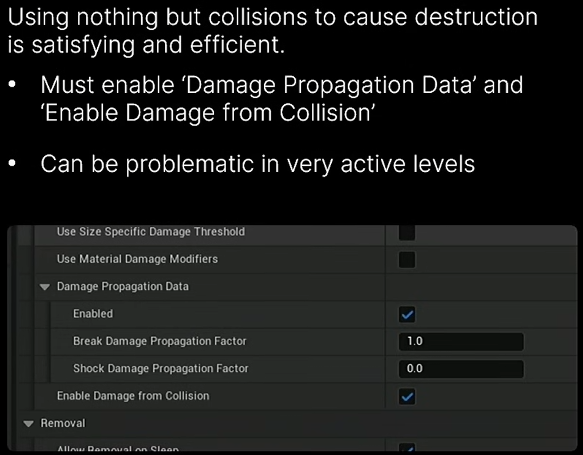
Niagara
Example in the content example project..